
Whitelist (Touch)
The "Whitelist" tab is available when used in combination with a Touchscreen.
In order to guarantee the correct and safety as much as possible for use of content on the display, a list of permitted web pages is used that can be visited from the display in question.
The standard Whitelist is maintained behind the scenes by Setdisplay and automatically concerns all web pages that are added by the user to the playlists or the menu buttons of the Touchscreen. As soon as a user of the display clicks on a button on the display or the playlist visits the relevant URL, Setdisplay checks whether these URLs are permitted and the page is displayed.
In addition, it may be necessary to offer visitors the option of going "deeper" into the relevant web pages or visiting other pages (for example YouTube, a map, or simply a link to another website as a tourist attraction).
By default, the "Whitelist" tab can be empty or it only shows the web pages that you have manually added (Note: If you have been using Setdisplay for a longer period, it is possible that you will find multiple URLs here, not just the manually added ones, these lines are from a situation before an update. These URLs have been added automatically during an update and can remain in the whitelist without any problems.)

If additional domains need to be whitelisted, for example because they, as already indicated, appear as extra links in the website, then these can be added manually.
The domain name can be entered in the following field:

The domain name can be entered without https:// and without www.
In the example below this concerns "nicewebpage.com"

After “Add” the URL will appear in the whitelist.
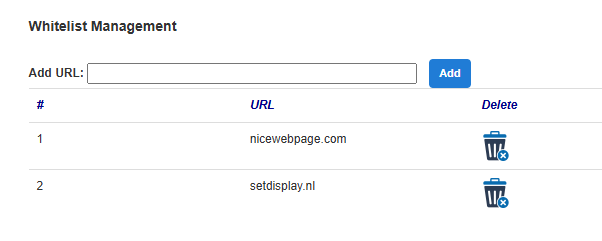
Add multiple domain names if desired. When access is no longer allowed, the domain can be removed from the whitelist.