
Content – Website URL
With Setdisplay a web page can be displayed in a simple way. Examples include a portfolio, references, reference projects etc. Basically it is possible to display any website page.
When there is a new playlist the content can be placed directly, when there is an existing playlist (for example because a text line has already been created, see also Content - Template) an additional playline can be added via the button "Add playline".
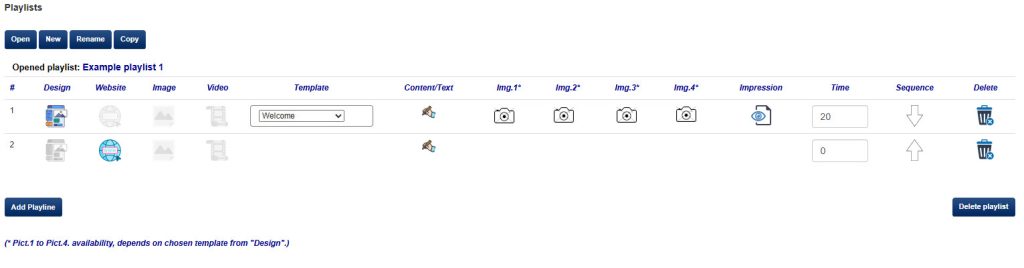
In the example above, a second line has been created (#2).
To place a website address as content, use the light gray website icon:  this will change color
  after clicking to confirm.
In the next column, under the heading "Content" the content itself can be placed via the “Edit” symbol . A second screen will open and the desired Name, for recognition on the Playlist Tab, and the URL can be entered.
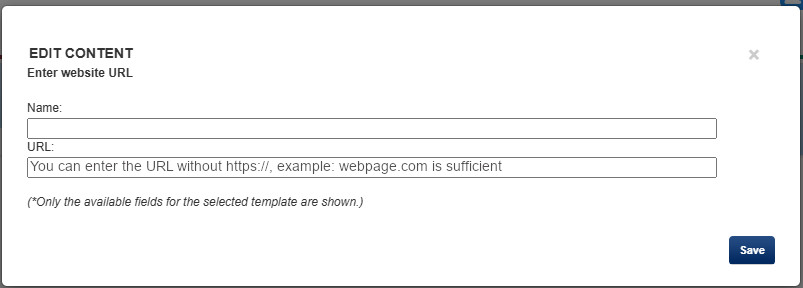
Entering the website address, the URL, can be done without https://.
Confirm by "Save" and the playlist will be shown again. Here the Name entered above the URL is also visible directly in the line.
Adjust the duration of the line so that the line is shown with the desired time. (For details about the duration, see also Content - template).

Change order:
Now that there is a second line in the above example, one or more arrows are also automatically shown.
 The order of the lines can be changed using the arrow(s).